Set futures exits from the actual position: choose trigger source, price, quantity and market or limit execution, then verify that the settings were accepted. A trigger is not a fill. Update remaining quantity from partial-fill reports, then confirm zero position and cancellation of related orders. Reduce-only prevents an exit from opening the opposite position; it does not guarantee execution. If quantity or cancellation is unclear, check the same order's records rather than blindly resubmitting. Do not add exposure when effective protection cannot be confirmed.
“My stop is set” sounds complete. The order record might instead show accepted settings that have not triggered, or a triggered limit still waiting for a fill. The same stop number can remain on screen in both states, while exposure is very different.
We will explain prices and orders, then follow a 0.050 BTC plan through partial entry, cancellation, stop triggering, staged exits and remaining-order checks. All execution reports are explicitly hypothetical. The point is to understand how quantity reaches zero, not merely locate a confirmation button.
Key takeaways
- Trigger price, order price and fill price have different roles. A limit stop can trigger without filling.
- Exit quantity follows the actual position, not an assumption that the planned 0.050 BTC filled.
- Reduce-only limits reverse openings. Entry remainders and obsolete exits still require separate cancellation checks.
Define the condition before choosing execution
An exit needs at least a price source, trigger direction, order method and quantity. “Leave at 58,900” omits whether that means last or mark price, how much to close and what order to submit. Here, a USDT linear BTC perpetual long closes by selling. BTC means bitcoin; USDT is the settlement asset. The perpetual futures guide explains the broader product and funding arrangements.
Keep trigger, order and fill prices separate
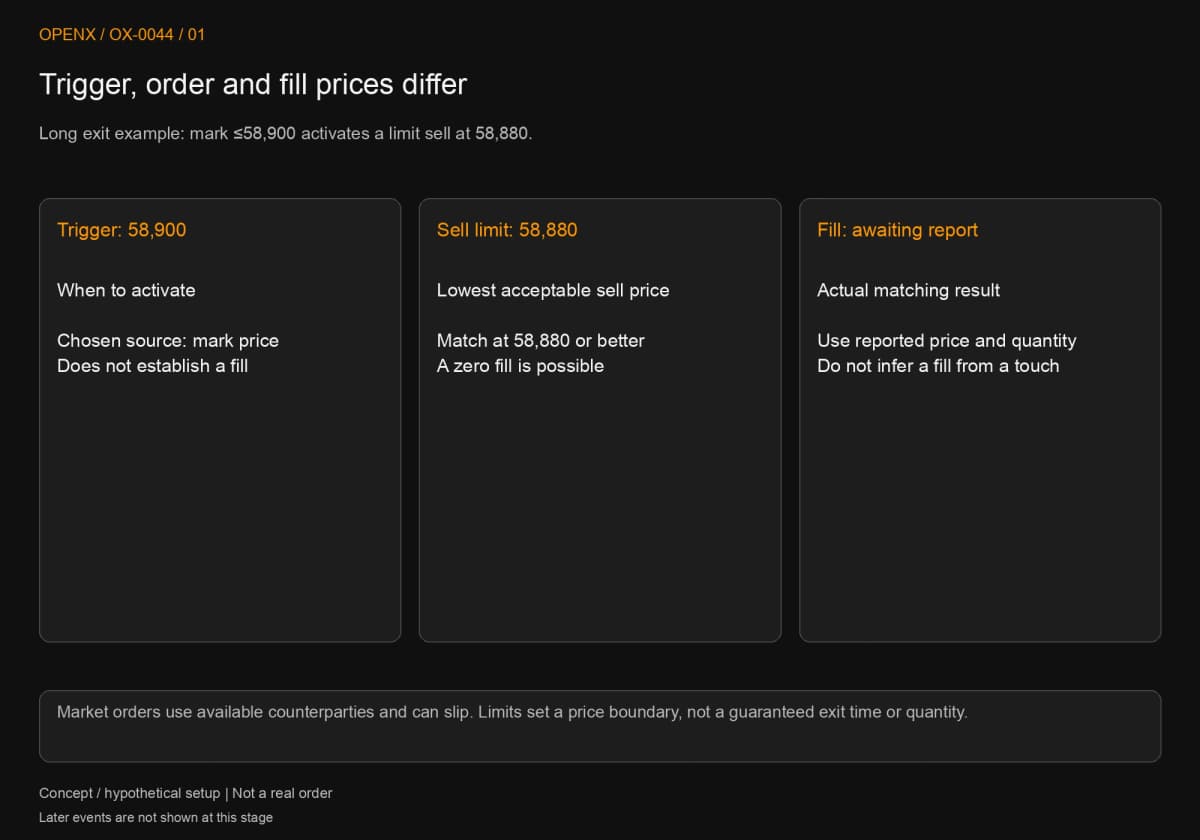
Trigger price determines when to activate an order. A limit price sets the acceptable execution boundary. Fill price comes from matching. “When mark price is at or below 58,900, submit a limit sell at 58,880” does not guarantee a sale at either number. It starts an attempt to sell at 58,880 or better once the condition is met.
Mark price is a valuation and risk reference; last traded price is the latest matched trade; index price is a spot reference assembled under platform rules. OKX's How to Set Take Profit and Stop Loss in Futures Trading, dated August 26, 2026, distinguishes trigger, order price and price source, noting that triggered limits may not fill. Actual price restrictions and availability depend on the product and current account rules.
Market and limit orders make different trade-offs
A market exit attempts to match available counterparties. Average fill can differ from trigger price; that difference is slippage. A limit exit preserves its price boundary but may fill partly or keep waiting. The choice concerns which failure conditions the plan can tolerate.
Bybit's Take Profit and Stop Loss, dated October 8, 2026, separates trigger reference, whole or partial position and execution method. A conditional limit still needs a matching price. Do not carry one product's defaults to another, or assume “market” guarantees an immediate full exit. If using slippage limits, also check what happens to quantity outside the permitted range.
Reduce-only controls direction, not execution
A reduce-only exit is intended to reduce an existing position rather than open the opposite side after closing. It creates neither liquidity nor a preferred price and does not replace checking whether an order remains effective. Available fields depend on product and position mode.
Reduce-only and close-on-trigger have defined scopes
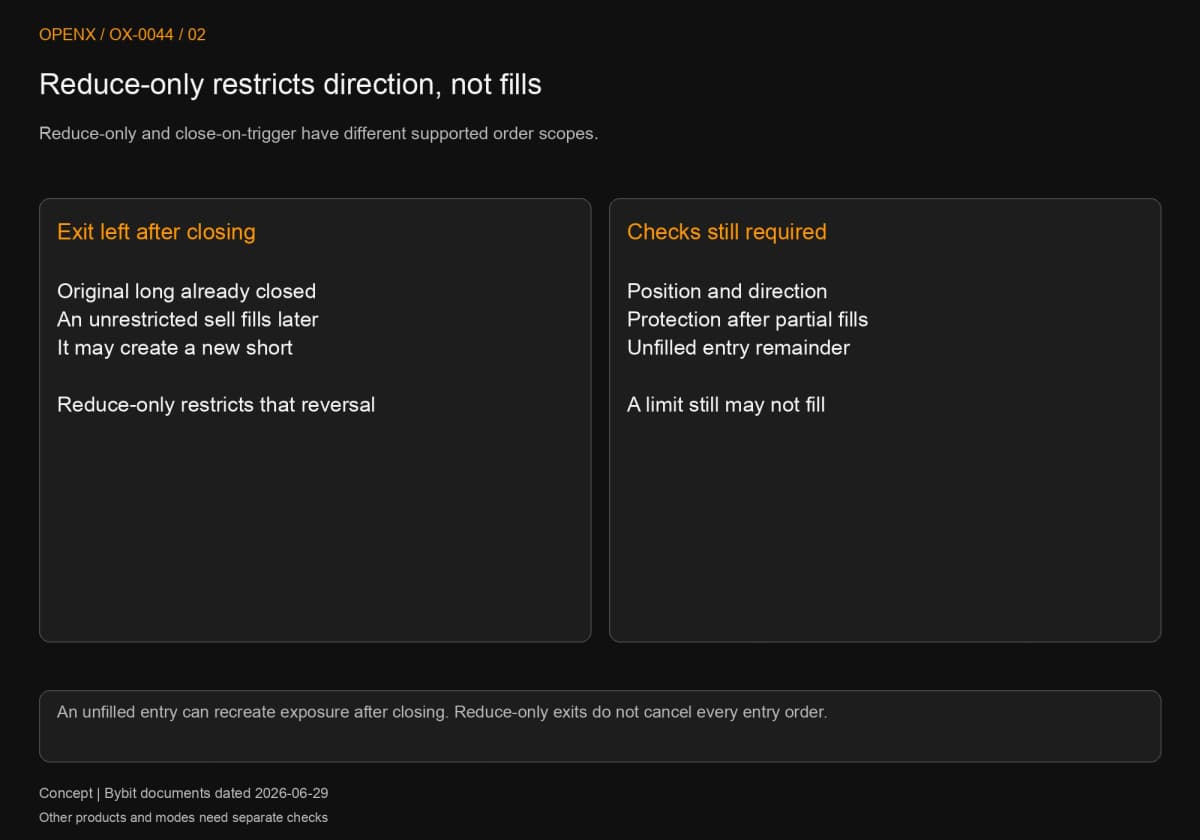
Bybit's Reduce-Only Order, dated June 29, 2026, describes reduce-only limits and possible adjustment or cancellation when quantity exceeds the position. Its Close On Trigger document of the same date addresses the closing purpose of conditional orders. After triggering, execution still follows market or limit rules. “For closing only” does not mean a limit must fill.
Suppose another order closes a long, then an unrestricted old take-profit sell fills later. It may open a new short. Reduce-only helps prevent that outcome, but current position, direction and reports still need checking. After partial profit-taking, verify that the remaining stop covers the new actual quantity rather than assuming automatic adjustment.
Check paired exits separately from unfilled entries
Some take-profit/stop-loss (TP/SL) features cancel one side when the other triggers. Two independently submitted orders do not necessarily share that behavior. Bybit's paired TP/SL handling applies to that feature, not every pair of opposing orders. Our example manages independent exits and checks each cancellation.
An easily missed order is the unfilled entry remainder. Closing the existing long does not necessarily cancel the original limit buy. A later entry fill can recreate exposure. Check entry remainders before and after exiting, not just the TP/SL list.
Partial-fill example: a 0.050 BTC plan becomes a 0.030 BTC position
Update quantity from order events and distinguish a cancellation request from confirmed cancellation. All prices, times, quantities and reports are hypothetical, not exchange testing or actual market records. The UTC clock shows event order only. This demonstrates reconciliation, not a recommended live setup.
Step 1: fix conditions and protect the confirmed fill
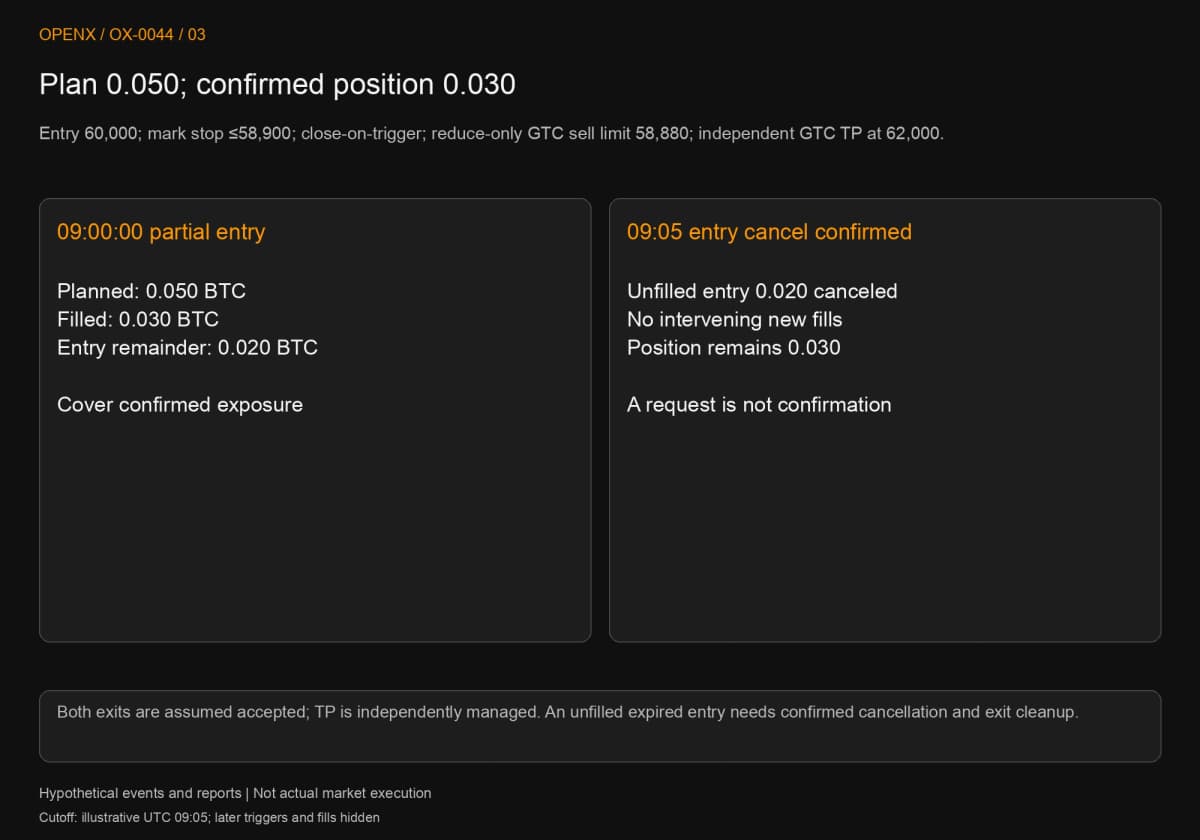
Assume a limit buy for 0.050 BTC at 60,000, waiting until 09:05. The stop triggers when mark price is at or below 58,900, uses close-on-trigger for its closing purpose, then submits a reduce-only good-till-canceled (GTC) limit sell at 58,880. GTC remains effective until filled or canceled. Independently place a reduce-only GTC take-profit limit sell at 62,000. It has no separate trigger price and is not automatically paired with the stop. If quantity remains three seconds after the stop triggers, request cancellation, verify it, then handle the confirmed remainder. Three seconds is this exercise's rule, not a promised platform delay or universal response window.
At 09:00:00, assume a fill report confirms only 0.030 BTC at an average 60,000, leaving 0.020 unfilled. Protect 0.030, not the planned 0.050. Also assume acceptance reports for the stop settings and the 62,000 take-profit order, with no later entry fills. Without acceptance in reality, check whether protection exists rather than assuming it does.
At 09:05, request cancellation of the entry remainder and receive confirmation that it is canceled, with no intervening fills of that 0.020. The position remains 0.030. If another 0.005 had filled before confirmation, it would instead be 0.035 and exits would need review. Clicking “cancel” does not invalidate late-arriving fill reports.
Step 2: a triggered limit stop need not reduce the position
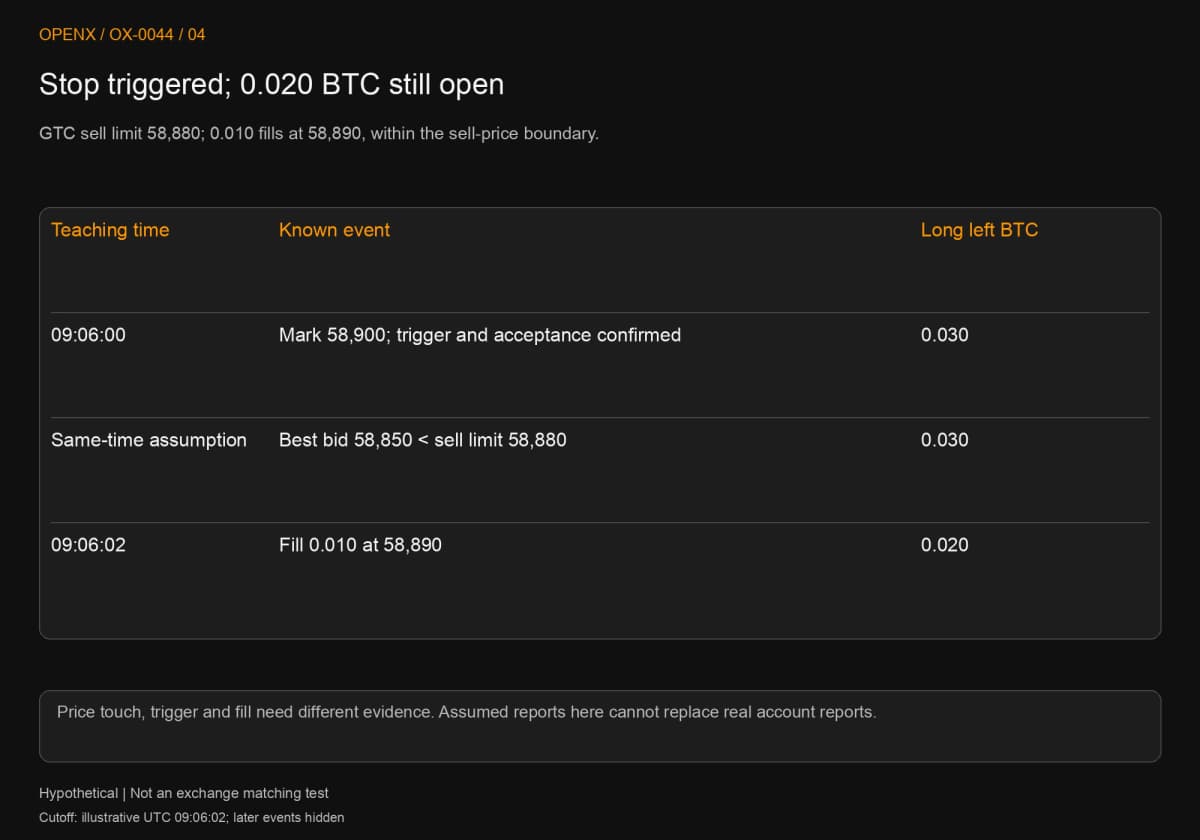
At 09:06:00, hypothetical mark price falls to 58,900 and reports separately confirm triggering and acceptance. The 0.030 BTC limit sell at 58,880 starts waiting. Assume the best bid is only 58,850 with no higher buy orders. There is no counterparty at 58,880 or better, making “triggered, zero filled” consistent with the ledger.
A price observation alone establishes only that the condition was met. Trigger and acceptance reports are needed to record an activated order. Both are assumed here. If an actual request is rejected, busy or unknown, investigate its state rather than moving on as though submission succeeded.
At 09:06:02, assume a new fill of 0.010 BTC at 58,890. That is above the sell limit's minimum 58,880, so it respects the boundary. Remaining long quantity is 0.030 − 0.010 = 0.020. A fill below the 58,900 trigger does not invalidate the limit; the two prices serve different purposes.
Step 3: confirm cancellation before handling the remainder
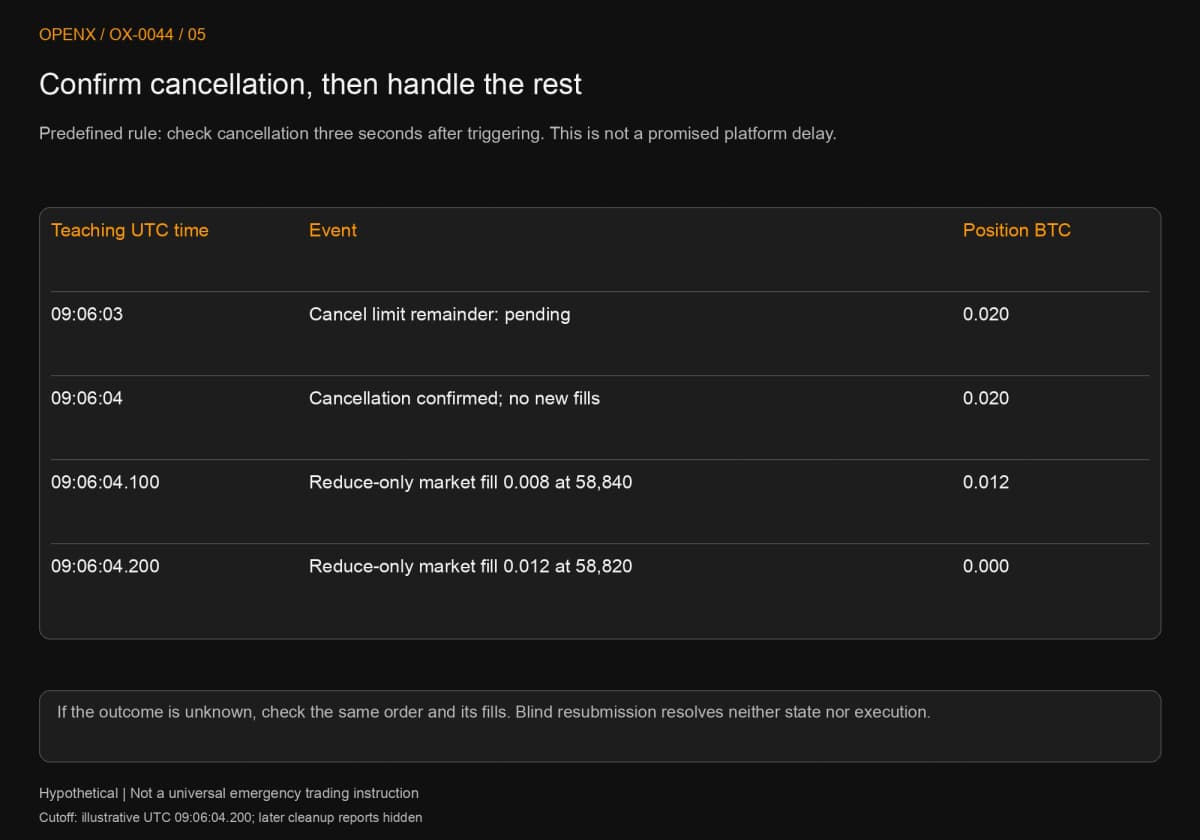
At the predetermined 09:06:03, 0.020 remains. Request cancellation of the old limit remainder and record “cancellation pending.” Do not yet assume a complete replacement exit can safely be submitted: further old-order fills could compete with a new order for the same quantity.
Assume cancellation is confirmed at 09:06:04, with no additional fills after 09:06:02 and actual quantity still 0.020. Only then submit a reduce-only market exit. Two hypothetical fills follow: 0.008 BTC at 58,840 and 0.012 at 58,820. Together they close 0.020; adding the earlier 0.010 exactly offsets the original 0.030 entry.
After each report, reconcile cumulative entry fills minus cumulative exit fills: 0.030 initially, 0.020 after the first exit, and zero only after both remaining fills arrive. Keep unfilled entry and exit quantities separate. Opposing pending orders do not cancel each other out as a position.
This is not a universal emergency trading procedure. If cancellation is unknown, reports disconnect or position quantity disagrees, pause at state verification instead of automatically resubmitting as though nothing succeeded. Available emergency controls depend on the account, platform and established response rules. More orders do not solve uncertainty about existing exposure.
Step 4: calculate each fill and clear remaining orders
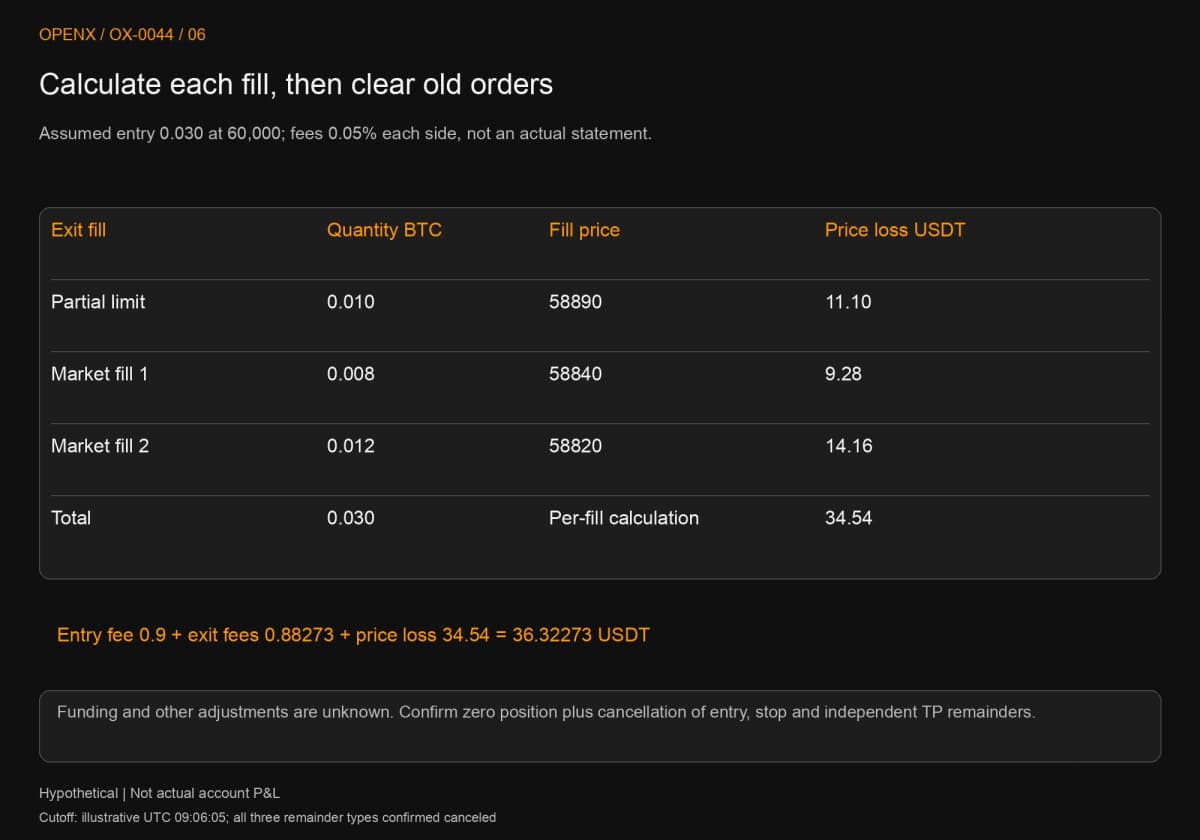
Three confirmed teaching fills require three calculations. The unfilled 0.020 entry remainder belongs in neither traded quantity nor profit and loss (P&L). The table and figure use the same basis; the final fill price cannot represent the whole exit.
| Hypothetical exit | BTC quantity | Fill price, USDT | Price loss, USDT |
|---|---|---|---|
| Partial limit fill | 0.010 | 58,890 | 11.10 |
| First market fill | 0.008 | 58,840 | 9.28 |
| Second market fill | 0.012 | 58,820 | 14.16 |
| Total | 0.030 | Calculated per fill | 34.54 |
Assuming all 0.030 exited at the 58,900 trigger would produce a 33 USDT loss. The hypothetical fills produce 34.54, a 1.54 difference that cannot be erased by substituting trigger price for fill price. The two market fills average 58,828, weighted by quantity. That average applies only to the final 0.020, not the full 0.030 exit.
Separately assume 0.05% trading fees on entry and exit. Entry fee is 0.9, total exit fees 0.88273, and price loss plus illustrative fees is 36.32273 USDT. This uses assumed rates, not a real statement. Funding and other adjustments remain unknown, so it is not final account net P&L. Keep execution, planned prices and rates separate when reproducing it.
At 09:06:05, assume records confirm zero position, cancellation of the old stop remainder and cancellation of the independent 62,000 take-profit order. Only then does this process end. Clearing old orders does not change the P&L, but prevents them carrying into the next trade. Actual operations must follow your own order list and reports.
Distinguish failure states after setup
Not triggered, zero filled, partly filled, rejected and unknown are separate states. Calling all of them “failed” obscures whether to check prices, order conditions or communications. Calling them all “stopped out” misstates remaining exposure.
No fill, rejection and unknown result require different records
If the entry expires unfilled, verify cancellation and clear preset exits. No position means no winning trade. If a conditional order is rejected, preserve the reason and parameters, then check product status, quantity, mode and price restrictions. A partial fill reduces exposure only by its confirmed quantity; the rest remains.
A timeout differs from an explicit rejection. A stale screen can mean delayed reporting, not a nonexistent order. Query the same identifier and its fills before deciding what follows. Automatic resubmission under uncertainty can turn one intended exit into two orders.
Editing settings cannot undo an existing fill
A triggered stop may already have become another active order. Changing a displayed number does not prove that order was canceled. Save identifiers, confirmation times and effective quantities before and after changes. Do not rewrite the original plan with a trigger chosen after the event.
Connect exits to the complete trading plan
Exits must fit exposure and capital conditions; they cannot guarantee a loss ceiling on their own. Near platform risk thresholds, execution delays and different price sources matter together. Drawing a stop beyond a liquidation reference does not prove it can fill in time.
Size the position before checking funding and risk
Put stop distance, costs and available capital into futures position sizing. Do not start with maximum exposure and rely on a nearby stop to solve the risk. Limit-price control and market execution have different costs that belong in the pre-trade plan and testing.
Next steps: retain evidence for every state
Use the trading journal fields and templates for planned quantity, fills, cancellations and fees. Futures liquidation explains risk thresholds. Futures trading costs develops the total cost calculation.
This article teaches order mechanics, not investment advice. All example events and fills are hypothetical, not a platform test or proof of maximum real losses. Contracts retain liquidation, slippage, non-execution and system risks.