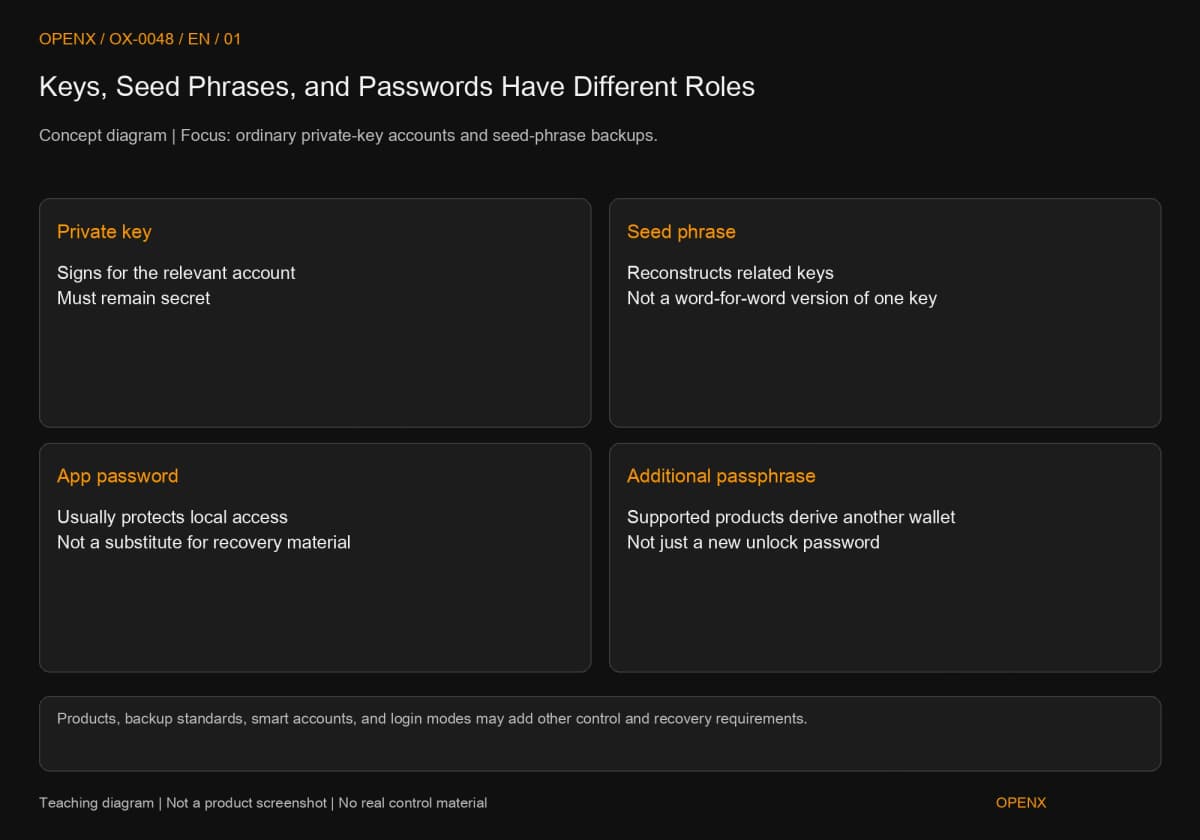
A private key signs; a seed phrase reconstructs related keys. A wallet unlock password usually protects local access. Under BIP-39 and MetaMask's account-recovery guidance, sharing an interface does not make one phrase cover every imported account. Establish each account's source and backup before recovering. If secrets are exposed, changing a password cannot take back the information that controls the account.
If one wallet app contains four accounts and you have copied one seed phrase, can you safely replace the phone? Not necessarily. Showing accounts together means one interface manages them, not that they share recovery information.
That is the question I would ask when someone says “it is backed up”: which account is covered, or do you simply remember writing something on paper? We will distinguish private keys, seed phrases, and passwords, then inventory the same accounts through source identification, recovery checks, and exposure decisions. The exercise records only public information and labels. You do not have to disclose any secret.
Private Keys, Seed Phrases, and Passwords Protect Different Layers
All three relate to security, but serve different purposes. A private key participates in signing, a seed phrase reconstructs related keys, and a wallet password usually protects access on the device. Calling all of them a wallet password can leave you with the wrong recovery information or changing a layer that cannot stop an attacker.
For the distinction between addresses, wallet interfaces, and custody, see crypto wallet basics. This article concerns accounts whose recovery information is held by the user. An exchange login password is not an on-chain private key.
A Private Key Signs; a Seed Phrase Reconstructs Related Keys
For an ordinary account controlled by one private key, possession of that key enables the relevant signatures. A seed phrase is an ordered set of words. In a wallet using BIP-39, it is converted into a seed, from which keys are produced using the relevant derivation rules. Derivation means calculating subsequent information from a shared starting point under fixed rules, rather than randomly selecting a new account each time.
BIP-39, “Mnemonic code for generating deterministic keys,” was proposed in 2013 and separates word generation, seed conversion, and subsequent key derivation. The practical point is that a phrase is not a word-for-word translation of one private key. You should not assemble favorite words into a new wallet. The source checked this specification on October 27, 2026; not all wallets use the same backup standard.
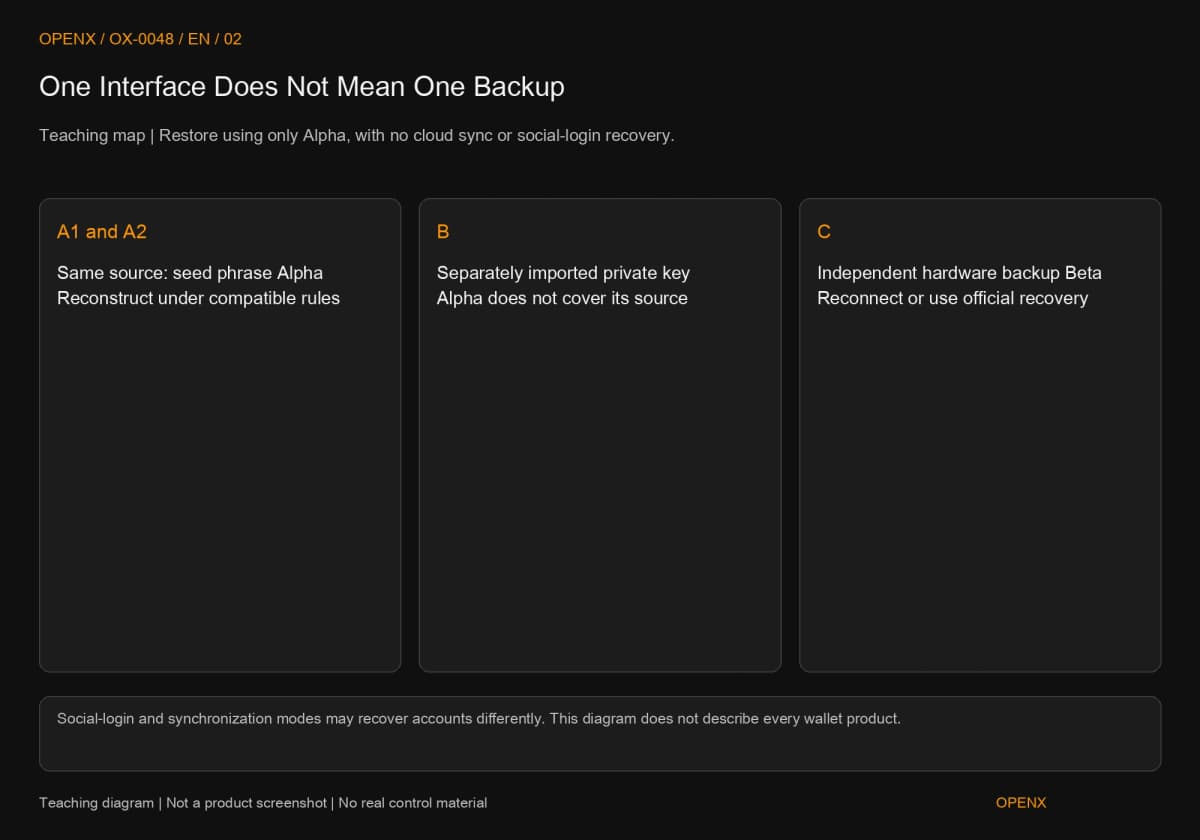
A phrase usually covers a broader set of keys than one separately imported private key, but it may still be wrong to say it restores the whole interface. Accounts from other keys, hardware, or another phrase must be considered separately. Smart contract accounts use on-chain code to define control, such as multisignature rules requiring multiple keys or separate recovery arrangements. One set of words cannot establish every account's control requirements.
A Wallet Password and a Passphrase Are Different
An app's unlock password usually protects local data and access. Changing it does not automatically invalidate an exposed private key. MetaMask's official “How to reset your MetaMask password” distinguishes reset processes by account-creation method and warns users to check other imported accounts before resetting. One product's button sequence does not apply to every wallet.
A passphrase, offered by some wallets in addition to a backup, is a different setting. In supported products, different passphrases with the same backup derive different wallets; this is more than changing a login password. Trezor's “What is a passphrase?” warns that a typo may open a different, empty wallet and that losing the correct passphrase may prevent access to the original assets. Do not enable it merely for a stronger security label before understanding recovery requirements.
Backing Up One Wallet May Not Back Up the Entire Interface
Determine backup coverage from key sources, not an app's name or account order. Identifying how each account was created tells you which accounts may be affected when one backup is lost or exposed.
Accounts Derived from One Phrase Share That Source
One phrase can create several accounts under the relevant rules. Recovery may still require adding the original accounts in order, selecting networks, or restoring token displays. A balance that does not immediately appear is not proof of missing assets. Compare the original public address and follow the product's official process.
Different backup standards, derivation paths, or passphrases may produce different accounts despite similar-looking steps. A derivation path selects a branch from a shared starting point. You do not have to memorize technical strings, but accepting the words does not establish that the original address has been recovered.
Separately Imported Keys and Hardware Accounts Need Their Own Sources
If B was imported with an independent private key, A's seed phrase cannot produce B's key merely because both appear in the same app. Trace hardware accounts to the hardware's own recovery information as well. MetaMask's “How to add missing accounts after restoring with Secret Recovery Phrase,” checked in the source on October 27, 2026, distinguishes phrase-derived accounts, imported private keys, and hardware accounts.
That document also describes Google, Apple, and Telegram login or synchronization methods. Some modes can synchronize separately imported accounts, so it would be wrong to claim that no recovery process ever restores imported accounts. This inventory specifically assumes recovery using only one seed phrase, without cloud synchronization or social-login recovery. Do not combine different product modes into one conclusion.
A hardware account appearing in software does not mean you must type the hardware seed phrase into that software to recover it. First use the supported process for reconnecting the hardware. See hardware wallet key isolation for how different uses affect the key environment.
Inventory Four Accounts and Their Backups
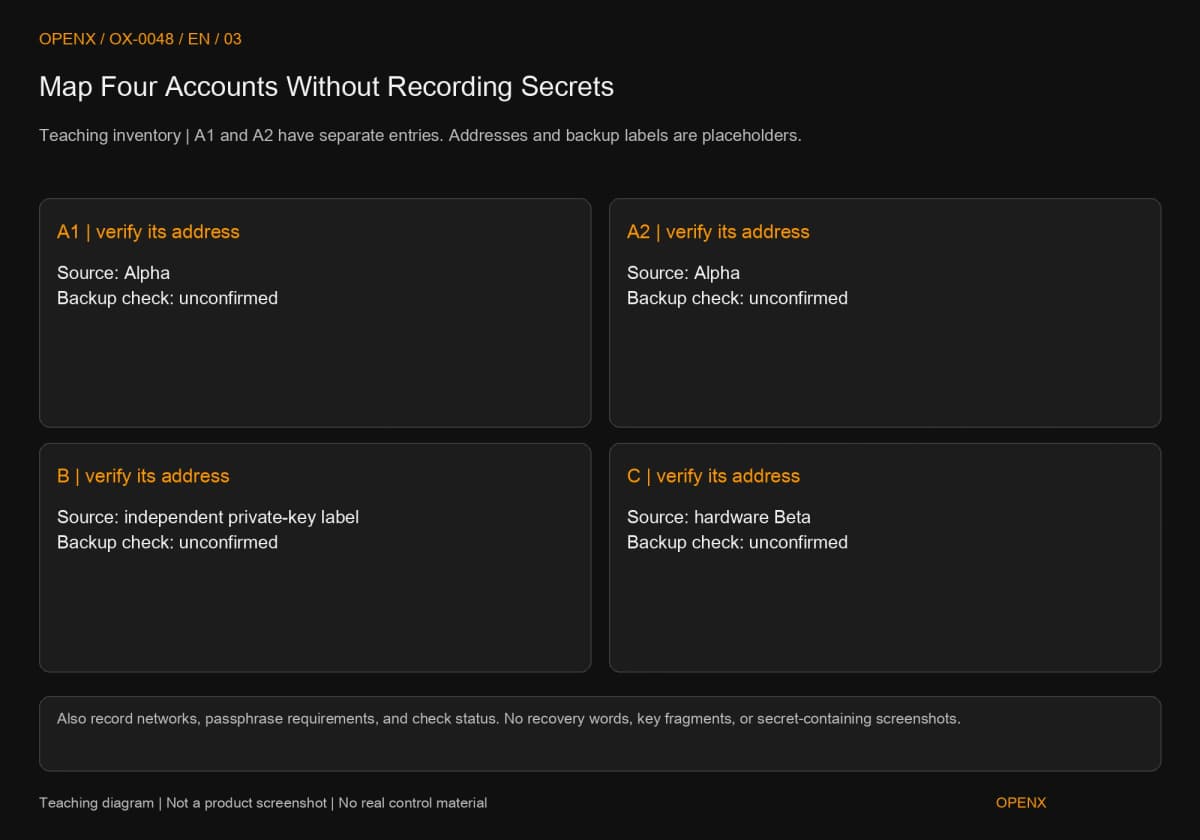
Use three sources and four accounts in this teaching exercise: A1 and A2 come from seed phrase Alpha; B uses an independently imported private key; C is controlled through hardware with separate backup Beta. Record A1 and A2 separately instead of combining them because they share a source. These are labels, with no real keys, addresses, or completed recovery operations.
Step 1: Record Sources Without Copying Secrets
Keep the original working device available. Do not delete or reset it. In a trusted wallet interface, identify each account's source: created there, imported with a private key, another seed phrase, or connected hardware. A name such as Account 1 is insufficient. If you no longer remember the source, mark it unconfirmed instead of selecting a category just to complete the record.
In a private inventory, label both A1 and A2 “Alpha,” B with an independent-private-key backup label, and C “hardware backup Beta.” Also record public addresses, networks used, and whether a passphrase is configured. That field contains only yes, no, or unconfirmed, never its contents. Backup labels must not contain fragments of the phrase either. Protect this record because it reveals account relationships.
Keep two states separate: knowing where the information is stored means it is located; verifying correctness through a trusted official method means it is checked. Seeing paper does not establish that it was copied correctly or that recovery succeeded. If information is missing, preserve access on the original device and follow official backup guidance. Do not sign out first and look for a solution afterward.
Step 2: Match Recovery Information to Each Public Address
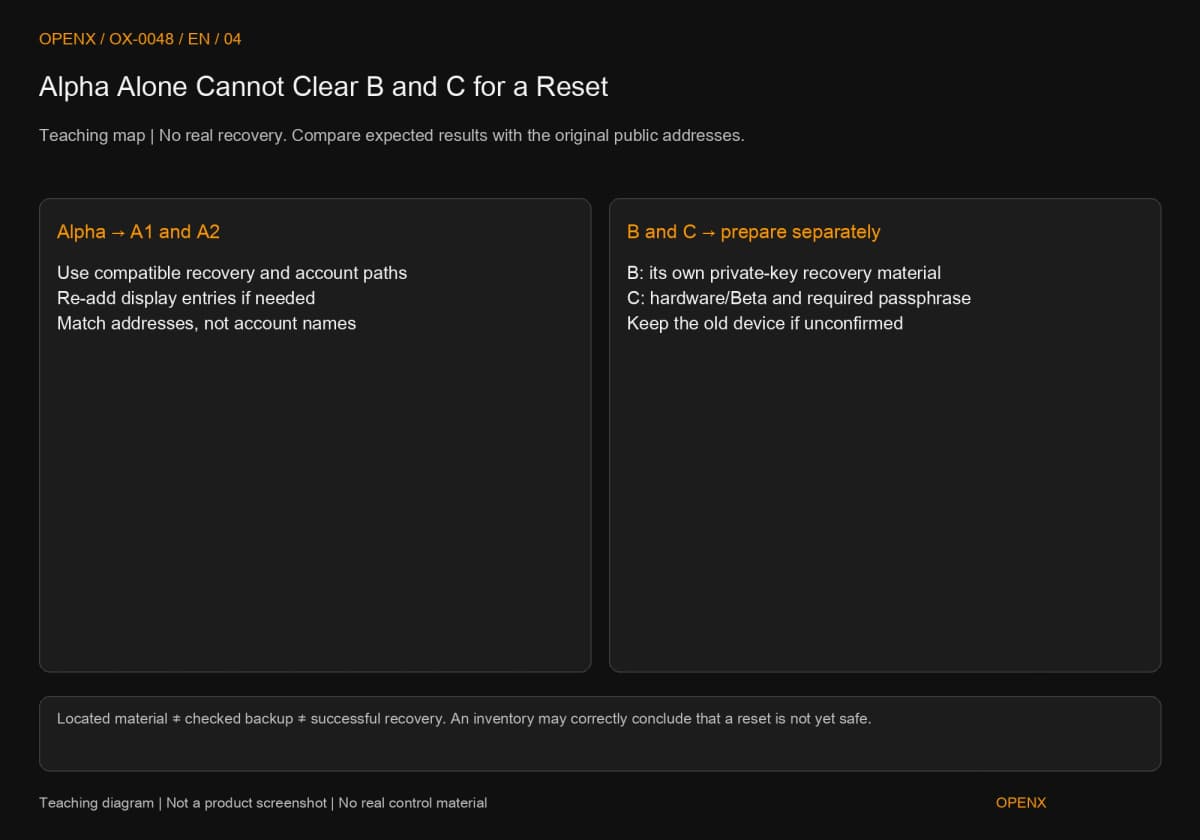
Now assume recovery uses only phrase Alpha through a compatible process with no synchronization involved. The expected recoverable accounts are A1 and A2 derived from Alpha. If one is not displayed automatically, follow the supported process for adding the original account and compare addresses. The original address is the check; seeing another Account 2 label in a new interface is insufficient.
B still needs its own private-key recovery information. C requires reconnecting working hardware or using an officially supported, compatible process with backup Beta and any required passphrase. Alpha does not cover these two sources. Mapping all four entries reveals the gap between possessing Alpha and being ready to replace a phone.
If B is accessible only on the old phone and its independent backup remains unconfirmed, the result is “B is not ready for a reset.” You need not erase the phone to complete an exercise. Complete B's backup through trusted guidance or make a separate plan before changing devices. Readiness for A1 and A2 cannot authorize a reset affecting B.
Step 3: Use Official Backup Checks Before Handling the Old Device
Some hardware products offer backup-check features. Follow their official instructions, since input methods and locations differ between devices. Do not test written words by entering them into a seed-phrase verification website found in a search ad or by sharing a screen with someone claiming to be support.
After checking, record only the result, date, and public address used for comparison. Do not save screenshots containing secrets. If you did not perform recovery, do not mark it successful. When actually replacing a device, establish that the new environment is trusted, required accounts are accessible, and addresses match before handling the old device under the product's rules. Repeatedly entering Alpha will not suddenly recover B or C when they were outside its coverage.
Forgotten Passwords, Missing Devices, and Exposed Secrets Need Different Paths
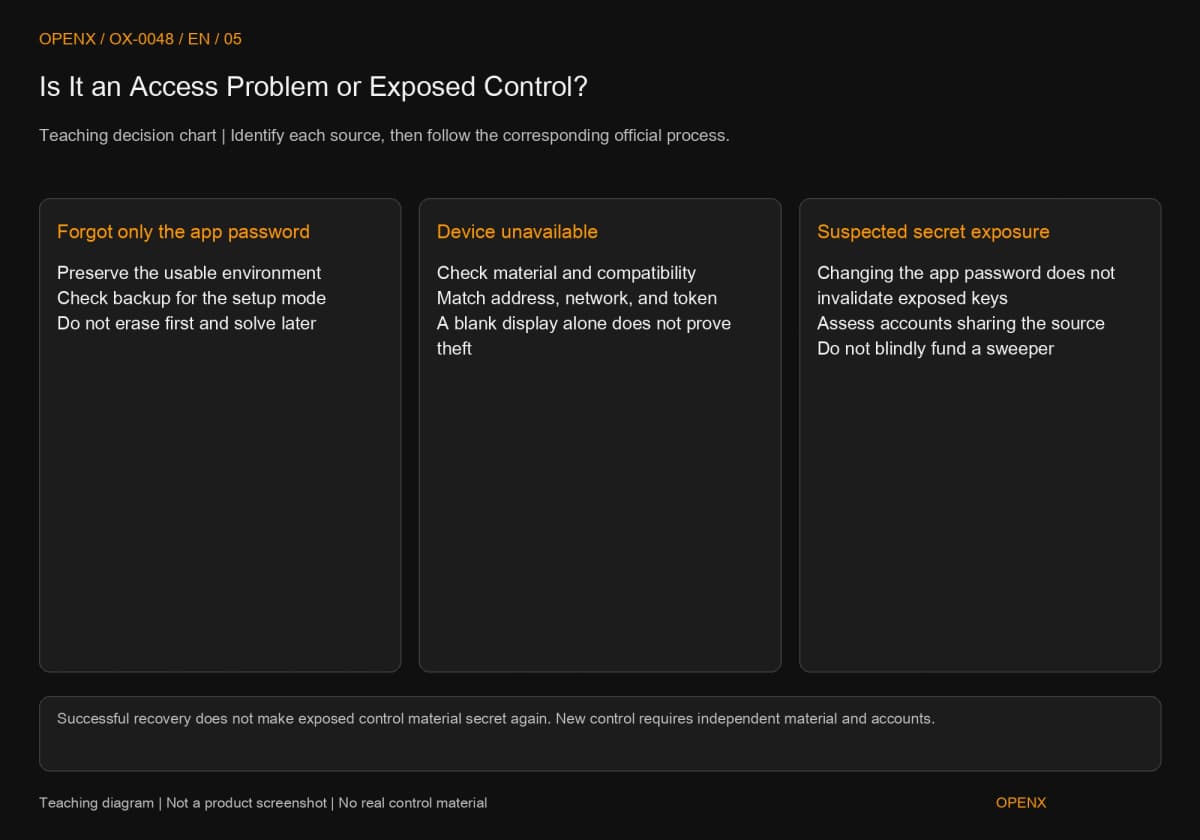
Before recovery, distinguish inability to open an interface from the possibility that someone else also controls the account. Correct information may restore access in the first case. In the second, a successfully recovered account may still be unsuitable for holding assets.
If You Only Forgot the Password, Preserve Working Access
First check whether a trusted, usable device remains and whether you have the required recovery information. Reset conditions depend on how the wallet was created. Before following official reset steps, check every source in the inventory so recovering Alpha does not erase the only environment that can access B.
If a device can still be unlocked safely, complete backups through the official method. Do not send secrets through a messaging app for someone else to inspect. The password protects local access; knowing it does not establish that a new device can recreate every original account.
If the Device Is Gone, Establish What Each Backup Covers
After failure or loss, use the inventory to find the appropriate information and compatible process, then compare public addresses. If the recovered balance is blank, check the account, network, token display, and required passphrase before concluding that funds were stolen. An unfamiliar on-chain outgoing transfer requires a separate possible-compromise assessment.
Without the necessary information or any remaining access method, no one can promise that support can reconstruct an ordinary self-custody account for you. If someone guarantees recovery in exchange for an unlock fee, seed phrase, or remote control, stop contact, preserve public transaction and conversation evidence, and verify through trusted official channels.
Suspected Exposure Is Not Fixed by Changing a Password
If someone obtains Alpha, A1 and A2 must both be treated as potentially affected under this example's assumption of no additional passphrase protection. Changing a local password cannot retrieve information someone else has obtained. If only B's independent private key leaks, that does not establish that Alpha also leaked. Investigate sources separately. See what to do after a wallet compromise next.
MetaMask's official “I've been hacked/scammed” warns that reusing stolen recovery information does not establish a fresh security boundary. New control requires new, independent information and accounts established through a trusted process, followed by an assessment of transfers. Gas measures computational work in transaction execution; “adding gas” usually means adding the native asset used to pay network fees. Sweeper bots that monitor deposits and quickly move funds, suspicious approvals, or asset-specific restrictions are reasons not to blindly fund a compromised account at a stranger's request.
Keep Backups Both Private and Recoverable
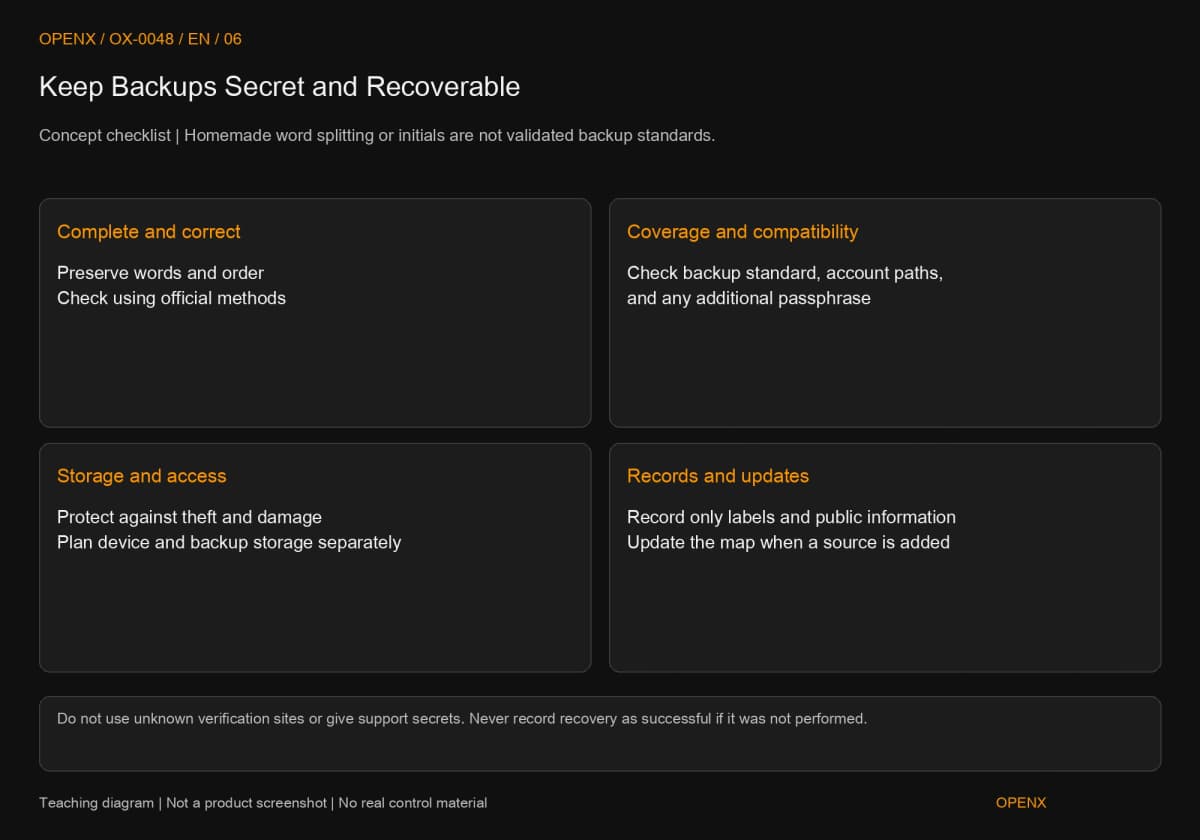
A good backup must resist unauthorized access while remaining usable by its owner after device failure. Hiding information so thoroughly that you cannot identify it, or concentrating every copy in one cloud photograph, undermines one of those goals.
Preserve Word Order, Standards, and Passphrase Requirements
For word-based backups, preserve complete words and their order, check them using the product's official method, and choose storage resistant to theft and environmental damage. Do not translate, abbreviate, or rearrange them. BIP-39 uses a specified word list and checksum information; any familiar-looking collection of words will not necessarily recover your account.
A passphrase, where used, also needs a secure storage arrangement suited to your risks. Do not overlook it simply because it is separate from the written phrase. As Trezor explains, different inputs derive different wallets. A recovered empty address therefore calls for checking the passphrase, not repeatedly trying and then immediately resetting the original device.
Separate Storage Without Inventing Your Own Word-Splitting Scheme
Keeping a device and its backup separately may reduce the effect of one location being compromised, but locations, authorized access, and recovery steps still need to be manageable. If using sharded or threshold backup schemes, follow a standard and process supported by the product. Splitting the first six words from the last six yourself is not a verified cryptographic scheme.
The inventory identifies which information belongs to which account and how far checks have progressed. Store the secrets separately. Update that reference when importing another key, changing recovery methods, or enabling a passphrase, rather than reconstructing the account history only after a phone breaks.
Next Step: Complete Backups Before Moving Funds
Choose one account you can still use and explain its source, backup coverage, and public address. Leave unclear items unconfirmed. Complete the inventory before changing devices or adding accounts. You do not need a real-money risk to demonstrate that you understand the process.
This article teaches account control and backups. It is not investment advice or a promise to recover an individual theft. Example accounts and labels do not represent real assets. Actual recovery depends on the product, creation method, and backup standard.