Hot and cold wallets mainly differ in where keys are stored and used for signing. Hot wallets make everyday use convenient; hardware wallets can keep keys inside a dedicated signing device. Compare backup readiness and signing risks as well. Long-term storage and frequent interaction can be separated, but sharing a seed phrase is not independent isolation. If recovery requirements or a signing request are unclear, do not move more assets in.
If you buy a hardware wallet and enter your existing seed phrase, have you completed a security upgrade? It looks straightforward, but it may preserve the original problem: moving to a different device does not erase everywhere that recovery information has already appeared.
I would focus on which risk you want to reduce and whether you could recover if something went wrong. We will separate custody from the key environment, then follow one user with both storage and everyday-use needs through setup, funding, interaction, and device loss. You do not need to enable features you do not use.
Before Choosing Hot or Cold, Identify Who Has Custody
Hot versus cold compares key environments; custody versus self-custody compares control. An exchange, a phone, and a hardware device cannot simply be ranked as three security levels. First establish who controls the signing authority needed to initiate a transaction.
If addresses, accounts, and transfer results are still unclear, start with the wallet transfer checks. Understanding that process makes it possible to identify what adding hardware actually changes.
Exchange Cold Storage Does Not Give You Its Private Keys
An exchange may hold some assets in cold storage, while customers still request withdrawals under platform rules. Customers cannot take away private keys managed by the exchange. Platform risk and login security therefore remain relevant. Ethereum.org's “Ethereum wallets” distinguishes centralized-exchange custody risks from wallets where users hold their own keys. A cold-storage claim does not remove that distinction.
Self-custody is not completed merely by downloading an app. Know whether account creation used a seed phrase, a social login with an encrypted backup, or another recovery method. Their dependencies are not interchangeable. The example below uses two self-custody accounts with independent seed phrases; it is not recovery guidance for every product.
Connecting Hardware Does Not Necessarily Give the Computer the Key
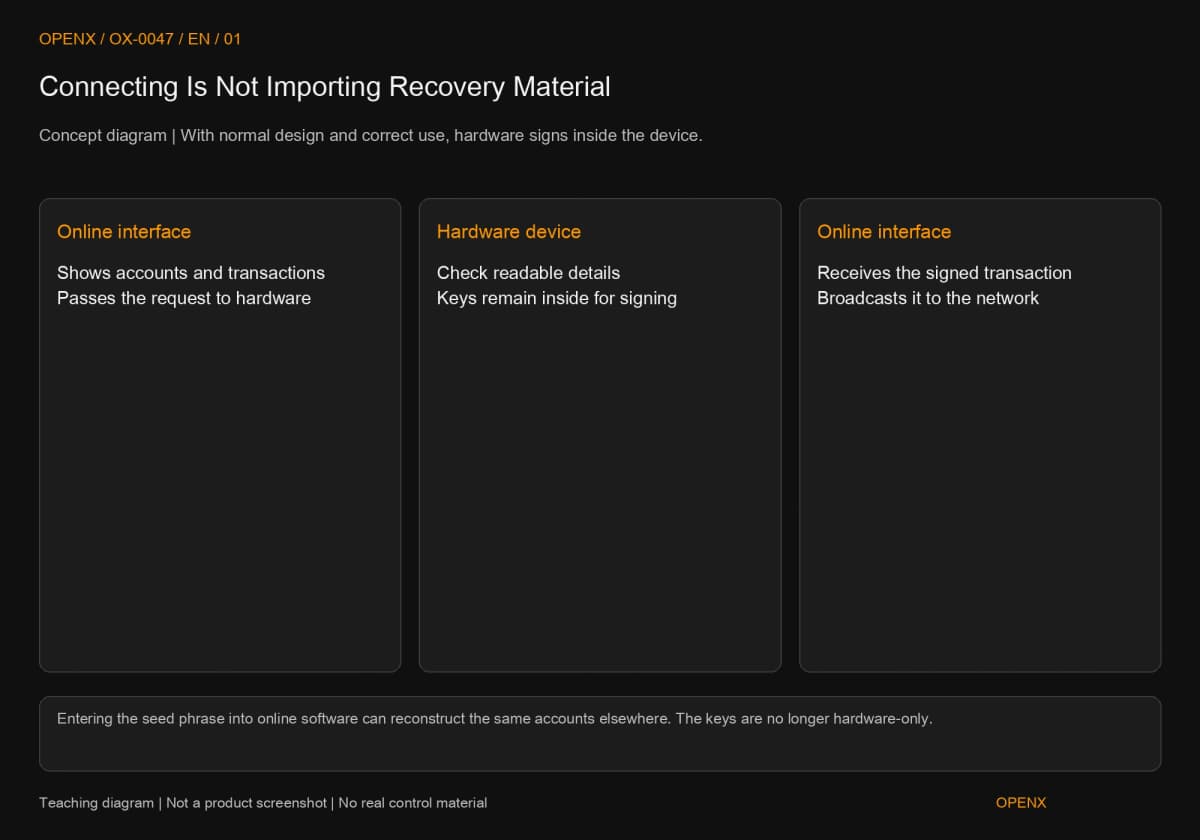
With a normal design and correct use, a hardware wallet can keep keys inside the device and return a signed transaction to an online interface for broadcasting. A phone or computer still participates. USB, Bluetooth, or another transport method alone does not establish whether a private key has been exported. MetaMask's official “How to use a hardware wallet with MetaMask,” checked in the source on October 27, 2026, separates the interface from hardware signing in this way.
A hardware account appearing in a browser wallet therefore does not automatically mean it has become a hot wallet. Ask whether you only connected the device or entered its recovery information into software. The latter lets the same keys be reconstructed in an online environment and changes the isolation conditions.
Hardware Reduces Some Key-Exposure Risks; You Still Need to Check What You Sign
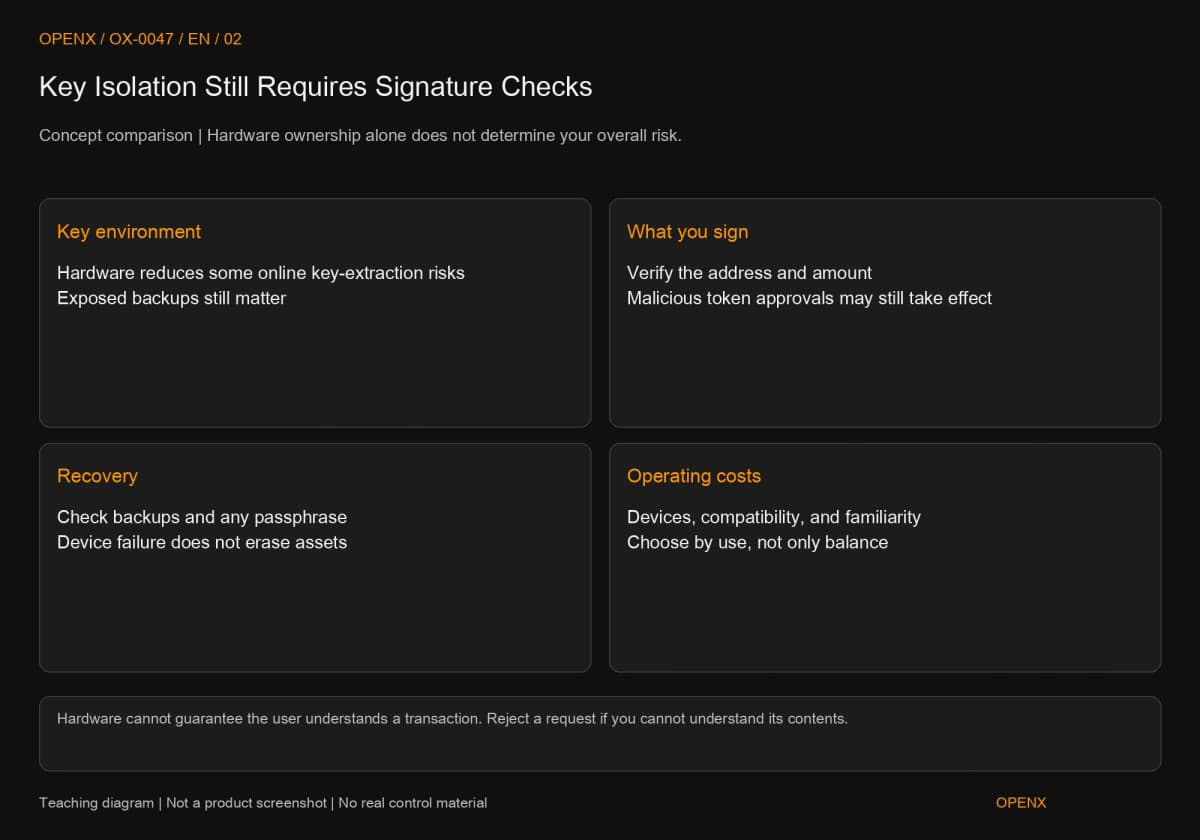
Hardware primarily reduces some risks of keys being directly exposed in an online environment. It cannot guarantee that what you sign matches your intention. Compare both how someone could obtain signing authority and whether you might approve the wrong action yourself.
What Can Be Isolated, and What Still Needs Checking
The device display provides a place to check addresses, amounts, and readable transaction information. If you approve the wrong recipient or excessive token permissions for a malicious contract, the signature may still be valid. Trezor's official “Funds sent without your authorization” includes exposed keys or backups and malicious actions among possible causes. Possessing the device is not a guarantee that assets cannot leave.
When you cannot understand a signature request, reject it instead of looking for a way to disable the warning. Token approvals let a specified spender, often a contract, use a particular token. Even if nothing moves immediately, assets may move later. One confirmation on a hardware device does not replace understanding the spender and permission scope.
The Cost of a Choice Includes Recovery Readiness
Hardware involves purchase, storage, and learning costs. Software wallets are usually easier to use on the go, but you must protect the online device and backups. Both can be affected by a broken phone, a missing device, an incorrectly copied backup, or deception. Buying a product cannot remove all these responsibilities.
If you cannot explain recovery without revealing secrets, completing backup preparation is more sensible than rushing to move everything. Conversely, people who can keep and check backups properly and have a clear long-term storage need are better placed to benefit from additional signing isolation.
One User's Needs, Split Across Two Accounts
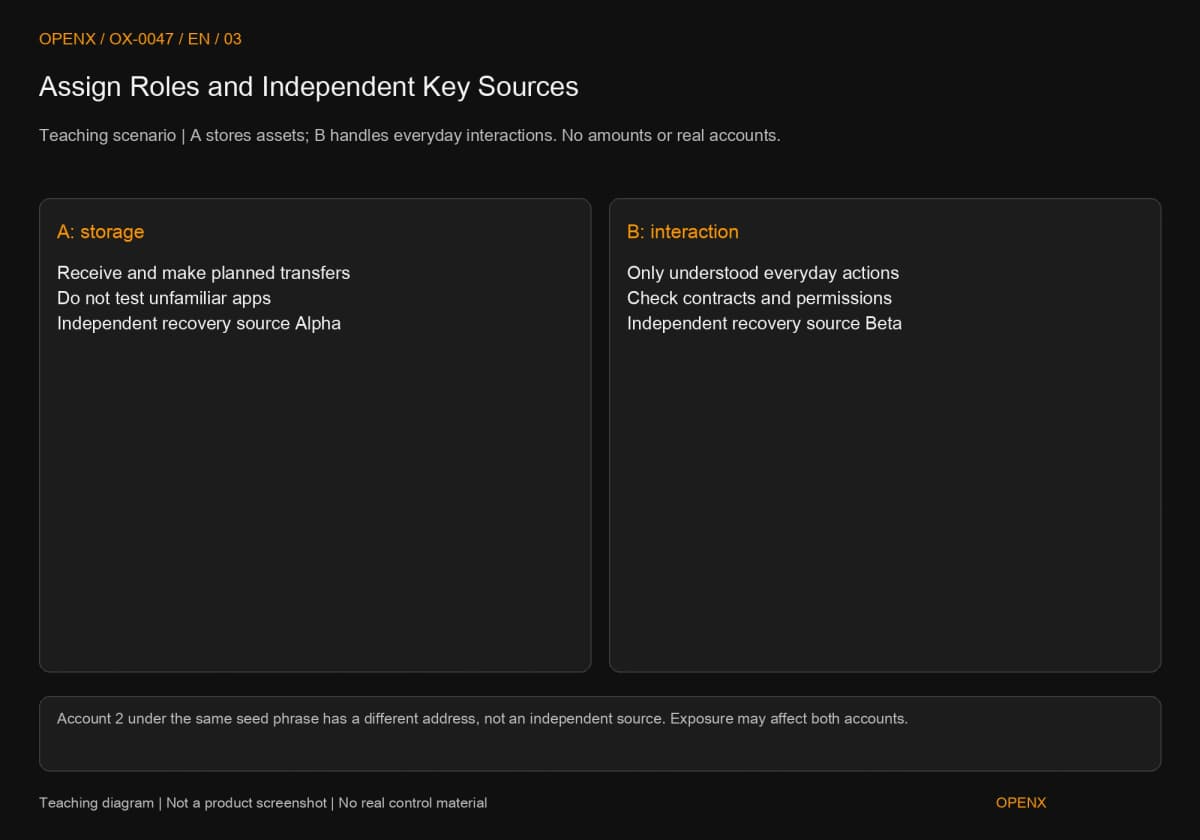
Assume a user wants to store some assets long term and occasionally use on-chain applications. Label the storage account A and the interaction account B, and work through their boundaries. No amount is prescribed and no real account is operated. Having two accounts does not eliminate every shared risk.
Step 1: Define the Tasks and Account Boundaries
A receives and stores assets, with occasional transfers planned in advance. It is not used to test unfamiliar applications. B handles everyday interactions the user understands. Write down what each account may do so an unexpected approval request can be checked against its purpose. This is a teaching arrangement, not a fixed allocation everyone should adopt.
The accounts need independent key sources, rather than two labels for the same wallet. Adding Account 2 may create another address, but if both are derived from one seed phrase, exposure of that phrase may affect both. Different public addresses do not establish separate recovery information. See what your wallet backup covers.
Step 2: Establish Separate Backups Instead of Sharing Secrets
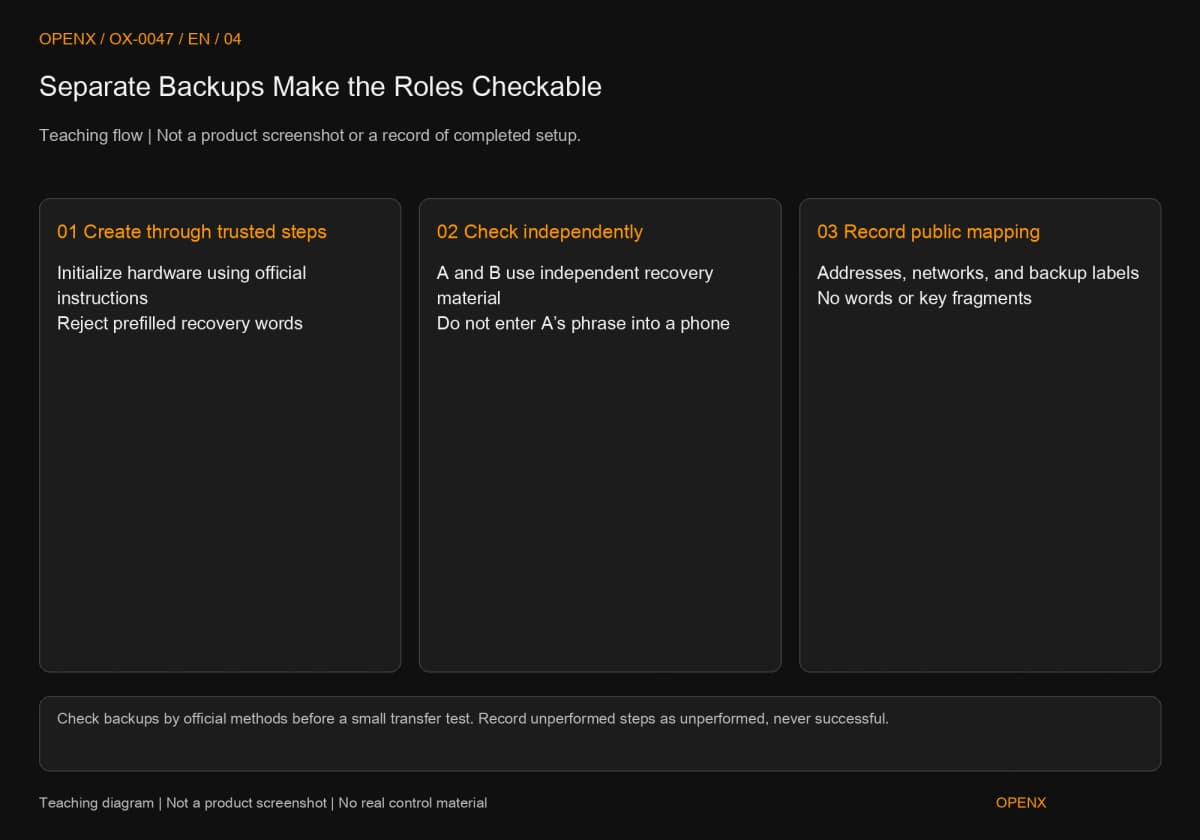
If you choose hardware for A, obtain it through a trusted official channel, create fresh recovery information through initialization, and check the backup using the official method. Do not use words already filled in for you inside the packaging. B should use an independent recovery source, saved through the chosen software's backup method. Do not import A's phrase into a phone simply for convenience.
MetaMask's hardware-setup documentation likewise recommends creating new recovery information on the hardware and then transferring existing assets to the new address. The reason is to avoid reusing secrets previously present in software. Buying another device of the same brand does not automatically create isolation.
Keep an account reference without secrets: A's public address, network, and backup label, and B's public address, network, and different backup label. These labels are your own index entries, not word initials, private-key fragments, or photographs. The reference helps locate the right information during recovery but still has privacy implications and should be protected.
Step 3: Verify the Receiving Route Before a Small Transfer
Get A's receiving address for the correct network from its trusted interface, and check it on the device when supported. Only after the backup check should you consider a small transfer from the original holding location. The amount must satisfy both sending and receiving thresholds; do not copy someone else's fixed amount. Cancel preparation if the network is unsupported, addresses differ, or required extra deposit information is unclear.
Wait until the original transaction status and receipt both match before deciding what to do next. An exchange source also requires checking its withdrawal fee and process. A self-custody source needs enough network-fee funds on that chain. One successful test establishes that route worked on that occasion, not that the backup has never leaked or the device is completely secure.
Do not consolidate all funds in A before testing whether you can send them back out. Understand receiving and sending with a small amount and verified fee conditions first. Record the actual transaction identifier and result. If you have not performed an action, record “not performed”; tutorial steps are not evidence of a successful check.
Step 4: Keep Everyday Interaction in the Operating Account
Before connecting an application, check that B is selected and inspect the requested network, asset, and action. If the application unexpectedly asks A to sign, reject it because it does not match the planned division. Keep in B only the assets whose risk you are prepared to accept for that purpose. Calling it an everyday account does not justify unlimited approvals.
Consider a token following ERC-20, an Ethereum token-interface standard. Its “Token Standard” records allowances by owner and spender. Assume a particular approval is granted only from B. It concerns B's specified token and spender; displaying A and B together does not automatically turn it into A's approval. But if you later sign the same request with A, or both backups are stolen, that division cannot protect A. The conditions supporting the boundary must hold for each action.
A Broken Device and an Exposed Seed Phrase Need Different Responses
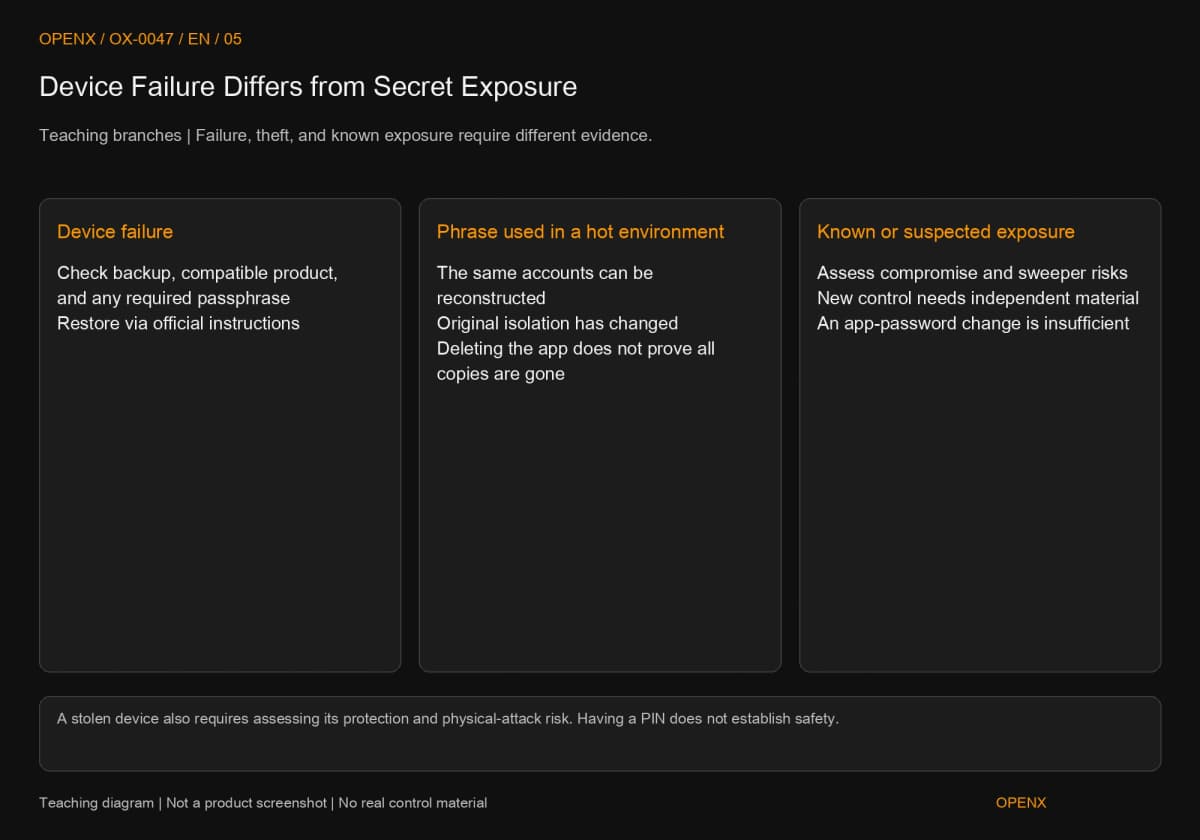
Losing a device is initially an access and recovery problem. Exposure of a secret is a control problem. “Buy a new device” does not solve both. Identify the affected layer before recovering, pausing use, or responding to a potentially compromised account.
If Only the Device Is Lost, Recover the Original Control
Assume A's hardware fails while the necessary backup remains complete with no known exposure. Follow the official recovery process for a compatible product and compare the recovered public address. A passphrase is an additional input supported by some products to derive another wallet from the original backup; it is different from a local unlock password. Trezor's “What is a passphrase?” explains that recovery needs both the original backup and the correct passphrase. Check the device, backup standard, and supported accounts rather than relying only on matching word counts.
Theft and hardware failure are also different. A stolen device requires evaluating its protection settings and physical-attack risks. A PIN alone does not establish safety. If suspicious asset movements or signs of backup exposure exist, treat it as a possible compromise instead of simply recovering and depositing more.
If the Backup Entered a Hot Wallet, Reassess Isolation
If you enter A's seed phrase into online software for convenient recovery, the same account can sign from another environment even while the hardware stays in a drawer. You can no longer claim that those keys have always existed only inside hardware. Deleting the phone app does not prove that no copy remains.
To establish isolation again, create new, independent recovery information and accounts through a trusted process, then plan transfers. Renaming the old account or changing its app password is insufficient. When secrets may already be exposed, also consider whether an attacker could move funds first, existing permissions, and asset types. This guide does not promise a universal transfer order that will protect every asset.
Choose for Your Operating Ability, Not Just the Balance
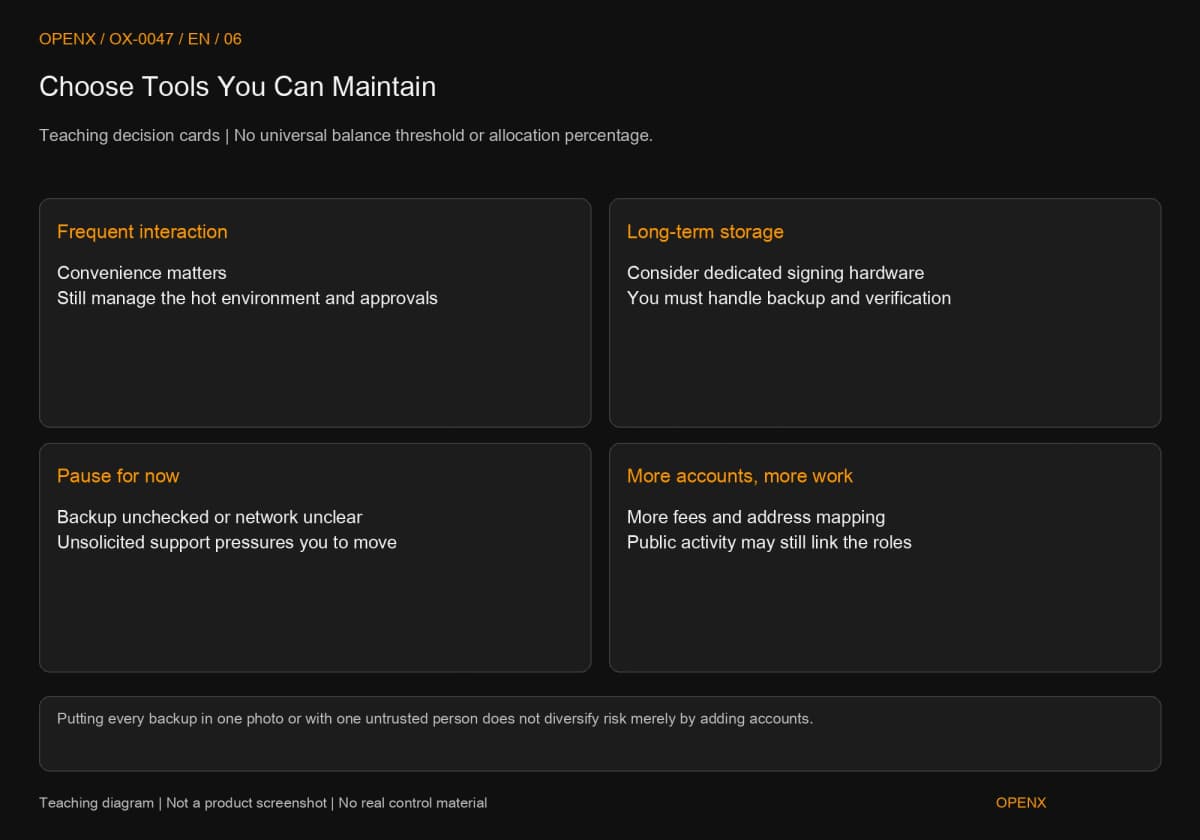
Frequent interaction and long-term storage have different needs, but an asset balance alone cannot determine one correct choice. More useful questions are how often you sign, whether you understand requests, where recovery information is kept, and whether you can tolerate delays from device failure.
Trade-Offs Between Frequent Use and Long-Term Storage
A hot wallet reduces everyday friction but requires managing secrets and signing risks in an online environment. Hardware adds device confirmation to signing, along with purchase, backup, and compatibility costs. If you have no long-term storage need, you do not have to add an unfamiliar recovery process just to acquire a security label.
Separating purposes has costs too: more accounts mean more fees, backups, and reference records. Transfers between A and B may publicly connect them. If both backups end up in one photograph or with the same untrusted person, the apparent separation may not improve the risk you care about.
Three Reasons Not to Rush a Move
Do not rush if backups are unchecked, you do not understand the new address's network, or an unfamiliar support contact is pushing an upgrade. Complete verifiable preparation before moving funds. If the original account may already be compromised, preserve public transaction evidence and seek trusted support instead of following unsolicited messages to pay fees or disclose a seed phrase.
Keep a Custody Record You Can Maintain
After choosing tools, record account purposes, public addresses, backup labels, and check status. That is more useful than merely noting that you own a cold wallet. Review the record whenever you add an account, change a recovery method, or enter a backup into another device. Keep the secrets themselves in appropriate protected storage.
This article teaches custody and operating risks, not investment or product-purchase advice. The example arrangement does not guarantee against loss. Actual recovery and transfers must follow the official rules of the products used.